Blog

  • Enterprise AI Implementation: A Step-by-Step Guide from Strategy to Production

    Enterprise AI Implementation: A Step-by-Step Guide from Strategy to Production

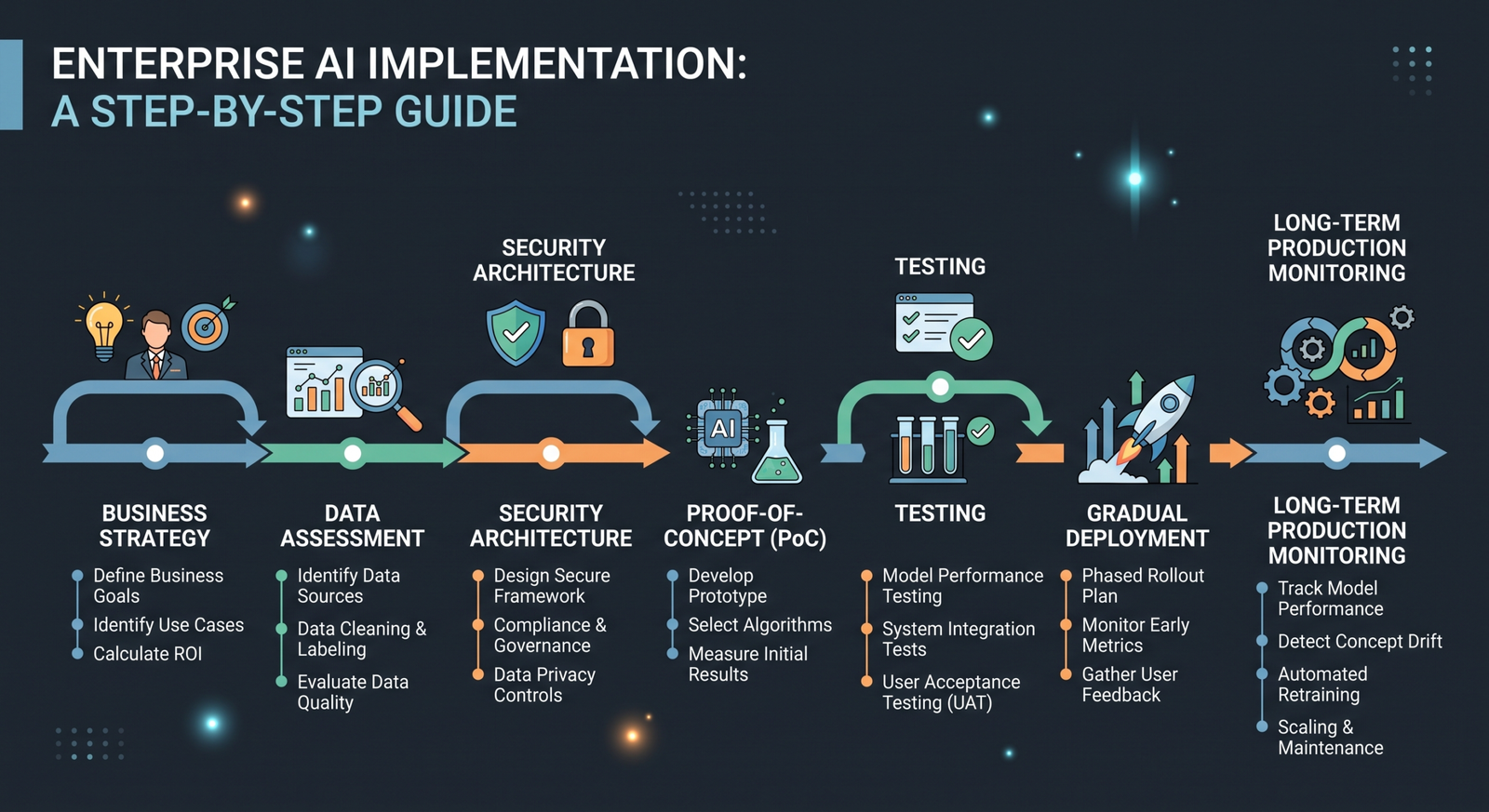
    Enterprise AI implementation is not simply a matter of selecting a model and connecting an API. Production AI systems must fit business processes, data environments, security requirements, existing applications, and measurable organizational goals.

    Many AI initiatives struggle because teams begin with technology before identifying the problem, ownership, data, and operating model. A stronger approach moves from strategy to controlled experimentation and then to production.

    This guide outlines a practical framework for implementing enterprise AI from the first business discussion to long-term operation.

    Step 1: Identify a High-Value Business Problem

    Start with a problem that is important enough to justify investment and specific enough to measure.

    Look for bottlenecks, repetitive manual work, slow decision cycles, high support volume, knowledge gaps, or expensive operational errors.

    A strong use case has a clear owner and a measurable outcome, such as reducing processing time, improving response speed, increasing task completion, or lowering the cost of a recurring process.

    Step 2: Define Success Metrics

    Before development begins, establish the baseline and target.

    Possible metrics include:

    • Processing time
    • Cost per transaction
    • Error rate
    • Customer response time
    • Employee productivity
    • Task completion rate
    • Escalation rate
    • User satisfaction

    Without measurable success criteria, it becomes difficult to determine whether the AI implementation is creating business value.

    Step 3: Assess Data and System Readiness

    Identify the data required for the use case and evaluate its quality, ownership, permissions, and accessibility.

    Also map the systems the AI solution must interact with. This could include CRM, ERP, customer support, document management, analytics, or internal databases.

    The goal is to understand the real environment before designing the architecture.

    Step 4: Choose the Right AI Approach

    Not every problem requires the same technology. Depending on the use case, the solution may involve machine learning, generative AI, retrieval systems, computer vision, predictive analytics, AI automation, or AI agents.

    Choose the simplest approach capable of meeting the business requirement. Complexity should be earned by the problem, not added for spectacle.

    Step 5: Design the Architecture and Governance Model

    Enterprise AI architecture should define where data flows, where models run, how systems communicate, and how access is controlled.

    Governance should clarify who owns the system, who can approve changes, how data is handled, how incidents are reported, and how performance is monitored.

    This is also the stage to define logging, audit requirements, retention policies, and human oversight.

    Step 6: Build a Proof of Concept

    A proof of concept tests whether the core technical approach can work. Keep the scope focused.

    For example, instead of building an AI assistant for the entire company, test it with one department and one approved knowledge domain.

    The proof of concept should answer important questions about accuracy, usability, integration feasibility, security, and expected business value.

    Step 7: Move From Prototype to Production

    A prototype proves possibility. Production requires reliability.

    This stage may include:

    • User authentication and role-based access
    • Integration with production systems
    • Error handling and fallback behavior
    • Monitoring and observability
    • Security testing
    • Performance and load testing
    • Backup and recovery planning
    • Documentation and operational procedures

    These engineering layers are often what separate an impressive demo from a dependable enterprise application.

    Step 8: Test for Performance, Safety, and Real-World Behavior

    Test the system using realistic scenarios, not only ideal prompts or clean datasets.

    Evaluate edge cases, incomplete information, unexpected inputs, system failures, unauthorized requests, and situations where the AI should refuse or escalate.

    For generative systems, establish evaluation criteria for quality, groundedness, consistency, and safe tool use.

    Step 9: Deploy Gradually

    A phased rollout reduces operational risk. Start with a limited user group, collect feedback, and monitor the results.

    Gradually expand access when the system demonstrates reliable performance. Keep rollback plans and human support available during early deployment.

    Step 10: Monitor, Govern, and Improve

    AI systems change as models, data, user behavior, and business processes change. Production implementation therefore requires ongoing monitoring.

    Track technical metrics and business outcomes. Review errors, escalation patterns, user feedback, and changes in operating costs. Update knowledge sources, prompts, workflows, and models through a controlled change process.

    Common Enterprise AI Implementation Mistakes

    Several patterns repeatedly cause trouble:

    • Starting with technology instead of a business problem
    • Attempting to automate everything at once
    • Ignoring data quality and permissions
    • Treating a prototype as production-ready
    • Giving AI systems unnecessary access
    • Skipping evaluation and monitoring
    • Failing to define ownership and governance
    • Measuring activity instead of business outcomes

    Avoiding these mistakes can save significant time and investment.

    Conclusion

    Successful enterprise AI implementation is a journey from business strategy to production engineering. The strongest programs begin with a measurable problem, validate the technical approach through a focused pilot, and then add the security, integration, monitoring, and governance required for scale.

    AI can create substantial value when it is connected to real workflows and managed as a long-term operational capability.

    Xhylo helps organizations move through this journey, from AI strategy and solution design to custom development, integration, deployment, and ongoing optimization.
  • How Much Does Custom AI Development Cost in 2026?

    How Much Does Custom AI Development Cost in 2026?

    One of the first questions businesses ask when considering an AI project is simple: how much will it cost?

    The honest answer is that custom AI development does not have one fixed price. A focused proof of concept and a production-grade enterprise AI platform are very different projects. Cost depends on the problem being solved, the systems involved, the quality of available data, security requirements, the level of AI autonomy, and the amount of engineering needed to deploy and maintain the solution.

    This guide explains the major cost drivers and provides a practical framework for estimating a custom AI project in 2026.

    What Does “Custom AI Development” Include?

    Custom AI development can include AI strategy, discovery, data preparation, model selection, application development, workflow integration, evaluation, security, cloud infrastructure, monitoring, and ongoing improvement.

    A simple AI prototype may require only a small team and a limited number of integrations. A production system may require backend engineers, AI engineers, data specialists, product design, DevOps, security review, and extensive testing.

    Typical Project Cost Ranges

    The following ranges are broad planning estimates, not fixed quotes. Actual pricing varies by region, team composition, technical requirements, and project scope.

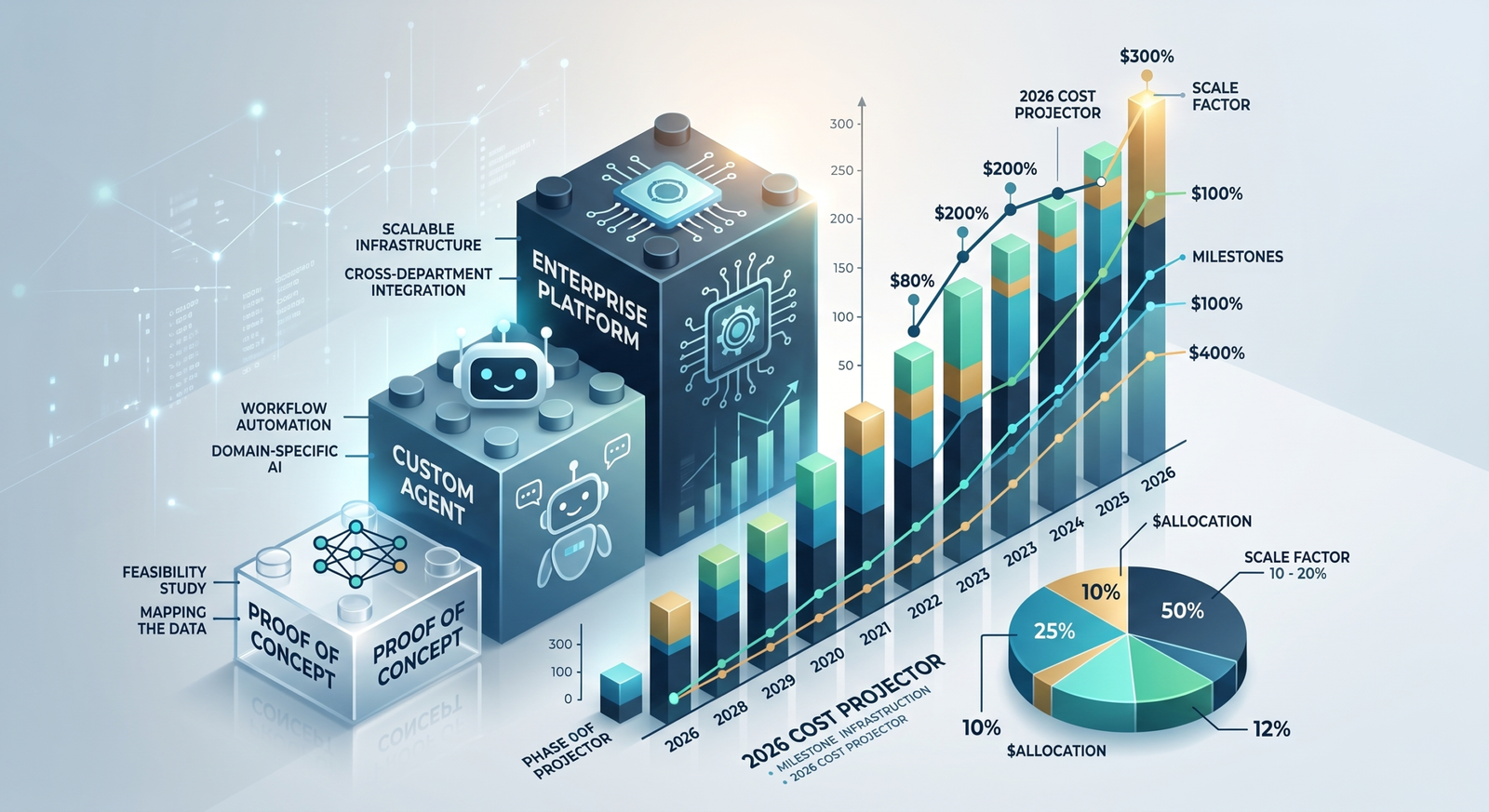
    • AI proof of concept: approximately US$10,000 to US$40,000
    • AI automation workflow: approximately US$20,000 to US$100,000
    • Custom AI agent: approximately US$30,000 to US$150,000 or more
    • Advanced machine learning solution: approximately US$75,000 to US$300,000 or more
    • Enterprise AI platform: approximately US$150,000 to US$1 million or more

    The purpose of these ranges is to show relative complexity. A detailed discovery phase is the best way to estimate a specific project.

    1. Project Scope and Complexity

    A system that summarizes documents is fundamentally different from a multi-agent platform connected to CRM, ERP, customer data, and internal tools.

    Every additional workflow, user role, integration, language, data source, or deployment environment can increase engineering and testing requirements.

    2. Data Readiness

    AI projects often become expensive when the required data is incomplete, inconsistent, inaccessible, or poorly governed.

    Costs may include data cleaning, labeling, migration, pipeline development, permission management, and quality checks. Understanding data readiness early can prevent unpleasant surprises later.

    3. Integrations With Existing Systems

    Many business AI projects must connect to existing software such as CRMs, ERPs, support platforms, document systems, payment services, or internal databases.

    Integration work can be a major part of the budget, especially when systems have limited APIs, complex permissions, or legacy architecture.

    4. Model and Infrastructure Costs

    Some projects use third-party AI models through APIs. Others may require private deployment, specialized models, fine-tuning, or significant computing resources.

    Operational costs can include model usage, cloud infrastructure, databases, storage, monitoring, and third-party services. These costs should be estimated separately from initial development.

    5. Security and Compliance Requirements

    A consumer prototype may have very different requirements from a system handling customer records, financial data, or confidential company information.

    Authentication, access control, encryption, audit logging, data retention policies, security testing, and compliance work can increase the initial investment but may be essential for production deployment.

    6. Testing and Evaluation

    AI systems require testing beyond standard software quality assurance. Teams may need to evaluate factual accuracy, task completion, unsafe behavior, tool use, bias, hallucination patterns, and performance under unusual inputs.

    A serious evaluation process adds cost, but it is also part of making an AI product dependable.

    How to Budget More Effectively

    The most effective approach is usually phased development.

    Phase 1: Discovery and feasibility. Define the business problem, available data, users, success metrics, and technical risks.

    Phase 2: Proof of concept or pilot. Build the smallest solution capable of testing the core assumption.

    Phase 3: Production development. Add integrations, security, monitoring, user experience, and operational controls.

    Phase 4: Scale and optimization. Expand successful workflows and improve performance based on real usage.

    This reduces the risk of investing heavily before proving that the AI solution creates meaningful business value.

    Questions to Ask Before Requesting a Quote

    Before contacting an AI development company, prepare answers to these questions:

    • What business problem are we solving?
    • Who will use the system?
    • What existing software must it connect to?
    • What data is available?
    • What level of accuracy or reliability is required?
    • What actions can the AI perform?
    • Are there security or compliance requirements?
    • How will success be measured?

    Clear answers lead to more realistic proposals and fewer surprises during development.

    Conclusion

    Custom AI development costs vary because the underlying projects vary dramatically. A focused pilot can often validate an idea with a modest budget, while enterprise-grade systems require greater investment in engineering, integrations, security, testing, and operations.

    Instead of asking only, “What does AI cost?”, ask, “What business outcome are we trying to achieve, and what is the smallest reliable solution that can prove its value?”

    Xhylo works with businesses to define AI opportunities, validate feasibility, and build custom AI solutions designed around practical business requirements.

  • How to Build an AI Agent for Your Business: A Complete Guide

    How to Build an AI Agent for Your Business: A Complete Guide

    AI agents are becoming an important way for businesses to turn large language models and other AI capabilities into systems that can perform useful work. But building a reliable AI agent is more than connecting a model to a chatbot interface.

    A business-ready agent needs a clear objective, access to the right information, carefully designed tools, security controls, testing, and ongoing monitoring.

    This guide walks through the major steps involved in building an AI agent for a real business environment.

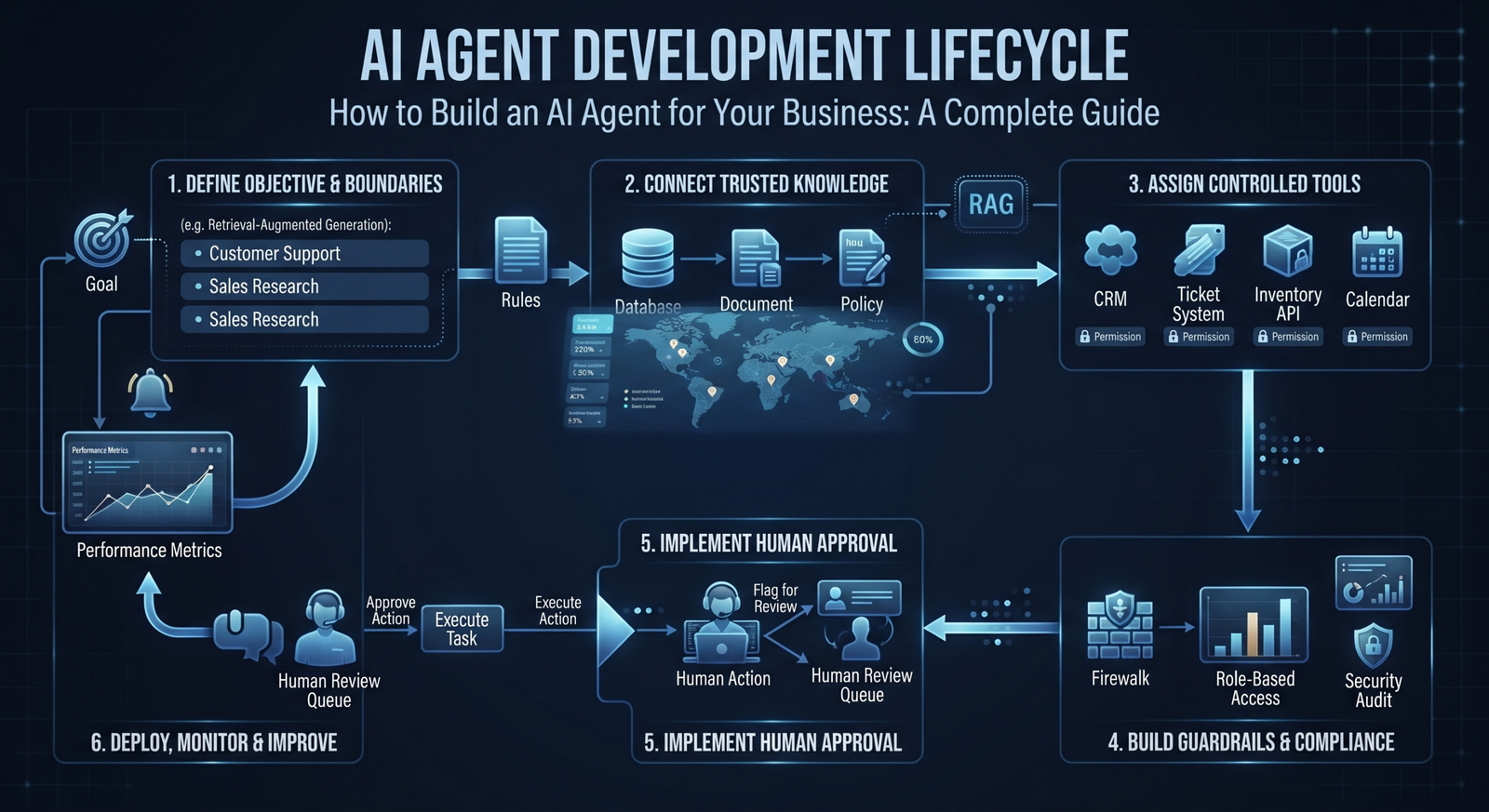
    1. Start With a Specific Business Problem

    Do not begin with “We need an AI agent.” Begin with a measurable problem.

    For example:

    • Support agents spend too much time searching internal documentation.
    • Sales teams manually research every new prospect.
    • Operations teams repeatedly investigate similar exceptions.
    • Employees struggle to find answers across disconnected systems.

    A narrow and valuable problem is easier to test than a general-purpose assistant. Define what success looks like before choosing a model or building an interface.

    2. Define the Agent’s Goal and Boundaries

    An agent needs a clear mission. Write down what it is allowed to do, what it must never do, and when it must ask a human for help.

    For example, a support agent may be allowed to search a knowledge base and create a support ticket. It may not be allowed to issue refunds or change customer account information without authorization.

    Boundaries are a product requirement, not an afterthought.

    3. Map the Agent Workflow

    Even autonomous systems need structure. Map the typical flow:

    Input → Understand the request → Gather context → Decide on an action → Use an approved tool → Check the result → Respond or escalate.

    This map helps identify where the agent needs data, where deterministic automation is sufficient, and where human approval is necessary.

    4. Choose the Right Model and Architecture

    The best model depends on the task, required accuracy, latency, privacy requirements, supported languages, cost, and deployment constraints.

    You may also need additional components such as retrieval-augmented generation for company knowledge, specialized models for document or image processing, and traditional software logic for validation.

    The architecture should serve the business requirement. Bigger models are not automatically better solutions.

    5. Connect the Agent to Trusted Knowledge

    An agent should not invent company policies or depend on uncontrolled information sources. Connect it to curated and authorized knowledge.

    This may include product documentation, support articles, internal policies, technical manuals, or approved databases. Retrieval systems can provide relevant context at the time of a request.

    Knowledge sources should be maintained, permission-aware, and traceable so teams can understand where an answer came from.

    6. Give the Agent Carefully Controlled Tools

    Tools allow an agent to do more than generate text. Depending on the use case, it may search a CRM, create a ticket, query an inventory system, schedule a meeting, or trigger an internal workflow.

    Every tool should have defined permissions, input validation, and limits. The agent should receive only the access required for its job.

    7. Add Human Approval Where the Risk Requires It

    Not every action should be fully autonomous. High-impact actions involving money, customer accounts, legal commitments, production systems, or sensitive data may require human approval.

    A useful pattern is human-in-the-loop operation. The agent can research, prepare, and recommend an action, while an authorized employee provides final approval.

    8. Build Guardrails and Security Controls

    Business agents need protection against incorrect instructions, unauthorized access, prompt injection, sensitive data exposure, and unintended tool use.

    Important controls can include authentication, role-based access, allow-listed tools, input and output validation, audit logs, rate limits, data handling policies, and escalation rules.

    9. Test With Realistic Scenarios

    Do not evaluate an agent only with a handful of ideal examples. Test normal cases, ambiguous requests, incomplete information, adversarial inputs, tool failures, and requests that should trigger escalation.

    Create an evaluation set based on real business scenarios. Measure accuracy, task completion, safety behavior, latency, and cost. Testing should continue after deployment because business data and user behavior change over time.

    10. Deploy, Monitor, and Improve

    Once the agent is ready for production, monitor how it performs. Track useful metrics such as successful task completion, escalation rate, error rate, response time, user satisfaction, and cost per completed task.

    Logs and feedback can reveal where the agent lacks knowledge, where tools fail, and where the workflow should be redesigned. An AI agent is an evolving system, not a one-time software delivery.

    A Practical Example

    Imagine a B2B company building an AI sales research agent. The agent receives a new lead, checks approved data sources, reviews the company profile, identifies relevant products, summarizes useful signals, and prepares a research brief.

    The sales representative reviews the brief before contacting the prospect. The agent accelerates preparation while the human remains responsible for relationship-building and final decisions.

    This type of focused agent is often more useful than a broad assistant that attempts to do everything.

    Conclusion

    Building an AI agent for business requires more than a powerful model. The most successful agents are designed around a specific objective, connected to reliable knowledge and tools, constrained by clear permissions, and continuously evaluated.

    Start small, choose a measurable use case, and build from a controlled pilot toward production. This approach reduces risk while helping the organization discover where AI agents can create lasting value.

    Xhylo helps businesses design, develop, integrate, and deploy custom AI agents that work with real business systems and workflows.

  • 10 Business Processes You Can Automate with AI in 2026

    10 Business Processes You Can Automate with AI in 2026

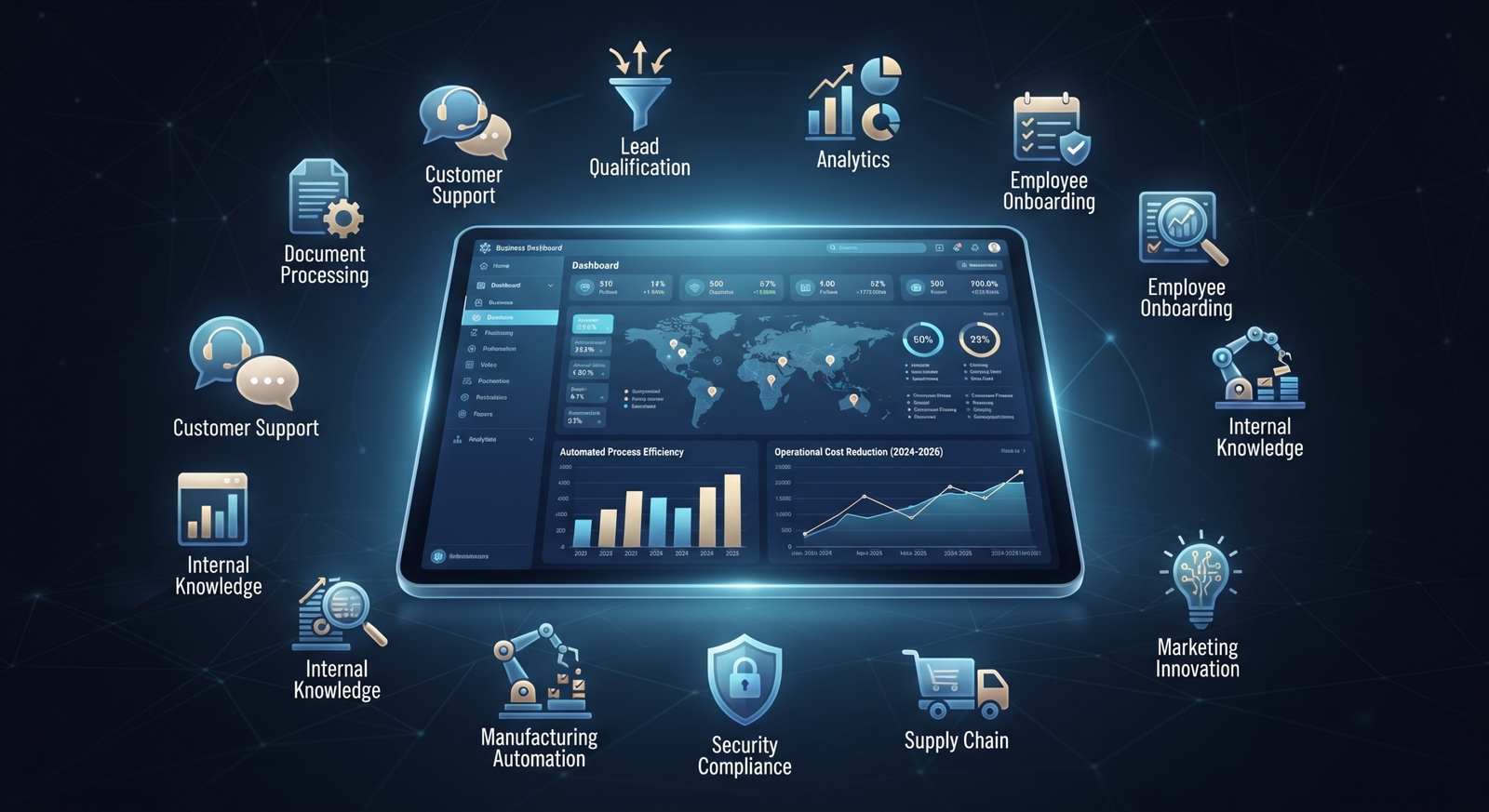
    In 2026, the most valuable AI projects are not necessarily the most futuristic ones. For many businesses, the biggest opportunity is hiding inside everyday work: repetitive tasks, slow handoffs, scattered information, and processes that depend on employees manually moving data from one system to another.

    AI can now process language, extract information from documents, summarize conversations, classify requests, generate content, and support decisions. When combined with business systems and workflow automation, these capabilities can remove significant operational friction.

    Here are 10 business processes worth evaluating for AI automation.

    1. Customer Support Triage and Response

    AI can analyze incoming emails, chat messages, and support tickets, identify the customer’s intent, determine urgency, retrieve relevant information, and route the request to the appropriate team.

    Simple questions can receive approved automated responses, while complex or sensitive cases can be escalated to a human agent. This helps support teams spend less time sorting requests and more time solving important problems.

    2. Document and Invoice Processing

    Invoices, contracts, purchase orders, applications, and forms often require employees to manually read documents and enter information into other systems.

    AI can extract key fields, classify documents, validate information against business rules, and send exceptions for human review. This can reduce manual entry while improving the speed of document-heavy operations.

    3. Lead Qualification

    AI can review inbound leads, analyze submitted information, enrich records from approved data sources, identify qualification signals, and prioritize leads for the sales team.

    Instead of treating every inquiry equally, businesses can create a workflow that identifies high-value opportunities and ensures timely follow-up.

    4. Sales Follow-Ups and CRM Updates

    Sales representatives often lose time updating CRM systems and remembering when to follow up. AI can summarize meetings, extract action items, draft follow-up messages for review, and update relevant records.

    The objective is not to replace salespeople. It is to reduce administrative work so they can focus on conversations and relationships.

    5. Employee Onboarding

    Onboarding frequently involves collecting documents, creating accounts, assigning training, answering recurring questions, and notifying multiple departments.

    An AI-powered workflow can guide new employees through the process, answer common policy questions from approved company knowledge, track missing steps, and trigger tasks for HR, IT, and managers.

    6. Internal Knowledge Management

    Employees often waste time searching through shared drives, documentation, chat histories, and internal portals.

    A secure AI knowledge assistant can help employees retrieve information from approved sources, summarize policies, and point users to the original documentation. Access controls are essential so employees only see information they are authorized to access.

    7. Reporting and Business Intelligence

    Many teams manually collect data from multiple systems before producing weekly or monthly reports.

    AI automation can gather approved data, generate summaries, identify unusual changes, and prepare report drafts. Human analysts can then focus on validating insights and making decisions rather than assembling the same report repeatedly.

    8. Data Entry and Record Management

    Data entry remains a major source of operational cost. AI can extract information from emails, forms, documents, and conversations, then prepare structured records for review or direct processing where confidence and controls are sufficient.

    Validation rules and audit trails should be part of the workflow, especially when the data affects finance, customers, or compliance.

    9. Marketing Content Operations

    AI can help marketing teams organize content briefs, repurpose approved material, generate first drafts, summarize campaign results, and maintain content workflows.

    The strongest use case is usually not “press one button and publish.” Instead, AI accelerates preparation while humans maintain strategy, brand voice, accuracy, and final approval.

    10. IT and Operations Incident Management

    AI can summarize incident reports, categorize issues, search approved technical knowledge, suggest next steps, and keep stakeholders updated.

    For recurring incidents, automation can trigger diagnostics or standard remediation steps. High-risk changes should remain subject to appropriate human approval.

    How to Prioritize AI Automation Opportunities

    Not every process should be automated first. Start by evaluating processes according to volume, repetition, business impact, data availability, error rates, and implementation risk.

    A good first project usually has a measurable baseline. For example: “Reduce average document processing time by 50 percent” or “Decrease manual ticket triage by 70 percent.”

    Choose one focused use case, build a controlled pilot, measure the results, and expand only after the business value is proven.

    Conclusion

    AI automation is becoming a practical operating capability rather than a distant experiment. Customer support, document processing, sales operations, reporting, onboarding, and internal knowledge are all areas where businesses can reduce repetitive work.

    The key is to start with a real operational problem, not a technology trend. A well-designed automation should connect to existing workflows, include security and human oversight where needed, and deliver measurable business value.

    Xhylo can help organizations identify high-impact opportunities and build AI-powered workflows that fit their existing systems and operations.

  • AI Agents vs AI Automation: What’s the Difference and Which Does Your Business Need?

    AI Agents vs AI Automation: What’s the Difference and Which Does Your Business Need?

    Artificial intelligence is moving from experimentation into everyday business operations. Companies are using AI to automate repetitive work, improve customer experiences, analyze information, and support faster decision-making.

    Two terms often appear in the same conversation: AI automation and AI agents. Although they are related, they are not the same thing. Choosing the wrong approach can lead to unnecessary complexity, higher costs, or a solution that does not fit the actual business problem.

    This guide explains the difference between AI agents and AI automation, where each approach works best, and how to decide which one your business needs.

    What Is AI Automation?

    AI automation uses artificial intelligence to improve or automate a defined business workflow. A workflow usually has a known trigger, a sequence of steps, and an expected outcome.

    For example, when a customer submits a support request, an AI-powered workflow can classify the request, extract important information, route it to the right team, create a ticket, and send an acknowledgement.

    Traditional automation follows predefined rules. AI automation adds capabilities such as natural language understanding, document extraction, classification, prediction, and content generation. The process is still generally designed around a structured workflow, but AI helps the workflow handle more complex or unstructured information.

    What Is an AI Agent?

    An AI agent is a software system that can work toward a goal by interpreting information, deciding what action to take, using available tools, and evaluating the results.

    For example, an AI sales agent could receive the goal of qualifying an inbound lead. It may review the lead’s message, search the CRM, identify missing information, ask follow-up questions, update records, and recommend the next best action.

    The important difference is that an agent is designed around goals and decision-making. It can select from available actions based on the situation rather than simply moving through one fixed sequence.

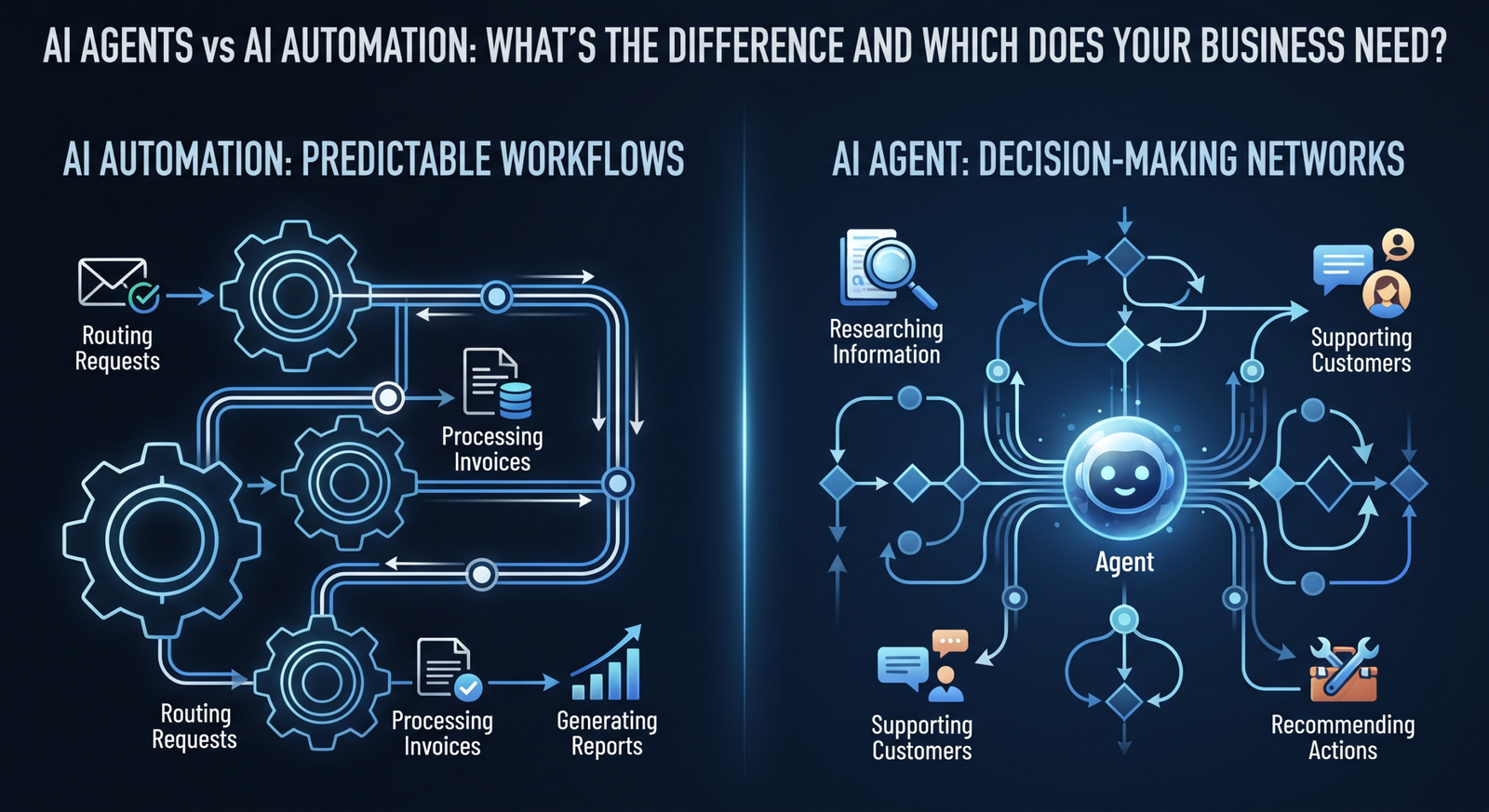
    AI Agents vs AI Automation: The Core Differences

    The easiest way to understand the difference is to compare workflow execution with goal-directed decision-making.

    AI automation is usually best when the process is predictable. You know the trigger, the major steps, and the desired result. The AI component helps process language, documents, images, or data inside that workflow.

    AI agents are more useful when the path to the result can vary. The system may need to gather information, choose between tools, respond to changing conditions, and decide what should happen next.

    In practice, the strongest business systems often combine both. An AI agent may make decisions, while automation handles reliable downstream tasks such as creating records, sending notifications, or updating databases.

    When Should Your Business Use AI Automation?

    AI automation is usually a strong choice when you have high-volume, repetitive processes with relatively clear rules.

    Common examples include:

    • Processing invoices and business documents
    • Classifying and routing customer requests
    • Generating recurring reports
    • Updating CRM records
    • Automating employee onboarding steps
    • Sending personalized follow-ups
    • Extracting information from forms and PDFs

    The goal is consistency and speed. If employees repeatedly move information between systems or spend hours performing the same administrative sequence, AI automation may produce immediate value.

    When Should Your Business Use an AI Agent?

    Consider an AI agent when the work requires more interpretation and flexible decision-making.

    Examples include:

    • A customer support agent that investigates issues across multiple knowledge sources
    • A sales agent that researches prospects and recommends outreach actions
    • An operations agent that monitors exceptions and coordinates follow-up tasks
    • A research agent that gathers, compares, and summarizes information
    • An internal knowledge agent that helps employees find answers across company systems

    Agents should still operate with clear boundaries, approved tools, security controls, and human escalation paths. More autonomy does not mean unlimited autonomy.

    How to Choose the Right Approach

    Start with the business process rather than the technology label. Ask five questions:

    1. Is the process predictable, or does every case require different decisions?

    2. Are the inputs structured, or do they include emails, documents, conversations, and other unstructured data?

    3. Does the system need to choose between multiple actions?

    4. What happens if the AI makes a mistake?

    5. Can the expected value justify the complexity of an agent?

    If the process is stable and repetitive, begin with AI automation. If the process requires reasoning across changing information and multiple possible actions, an AI agent may be a better fit.

    A practical strategy is to automate the predictable parts first and introduce agent capabilities only where flexible decision-making creates measurable value.

    The Business Value of Combining Both

    Businesses do not always need to choose one or the other. A modern AI system can use an agent as the decision layer and automation as the execution layer.

    For example, an agent could review a customer request and decide whether it requires technical support, billing assistance, or escalation. Once the decision is made, automated workflows can create tickets, notify teams, update the CRM, and schedule follow-ups.

    This combination keeps routine operations reliable while using AI intelligence where it provides the most value.

    Conclusion

    AI automation and AI agents solve different problems. Automation is ideal for repeatable workflows that need speed, consistency, and intelligent handling of information. AI agents are better suited to goal-driven work that requires context, decisions, and flexible actions.

    The best starting point is a clear assessment of your existing processes. Identify where teams lose time, where decisions become bottlenecks, and where better access to information could improve outcomes. From there, you can determine whether automation, an AI agent, or a combination of both is the right solution.

    Xhylo helps businesses design and build practical AI systems, from intelligent workflow automation to custom AI agents integrated with existing business tools.

  • Ethics & Safety in AI Development

    Ethics & Safety in AI Development

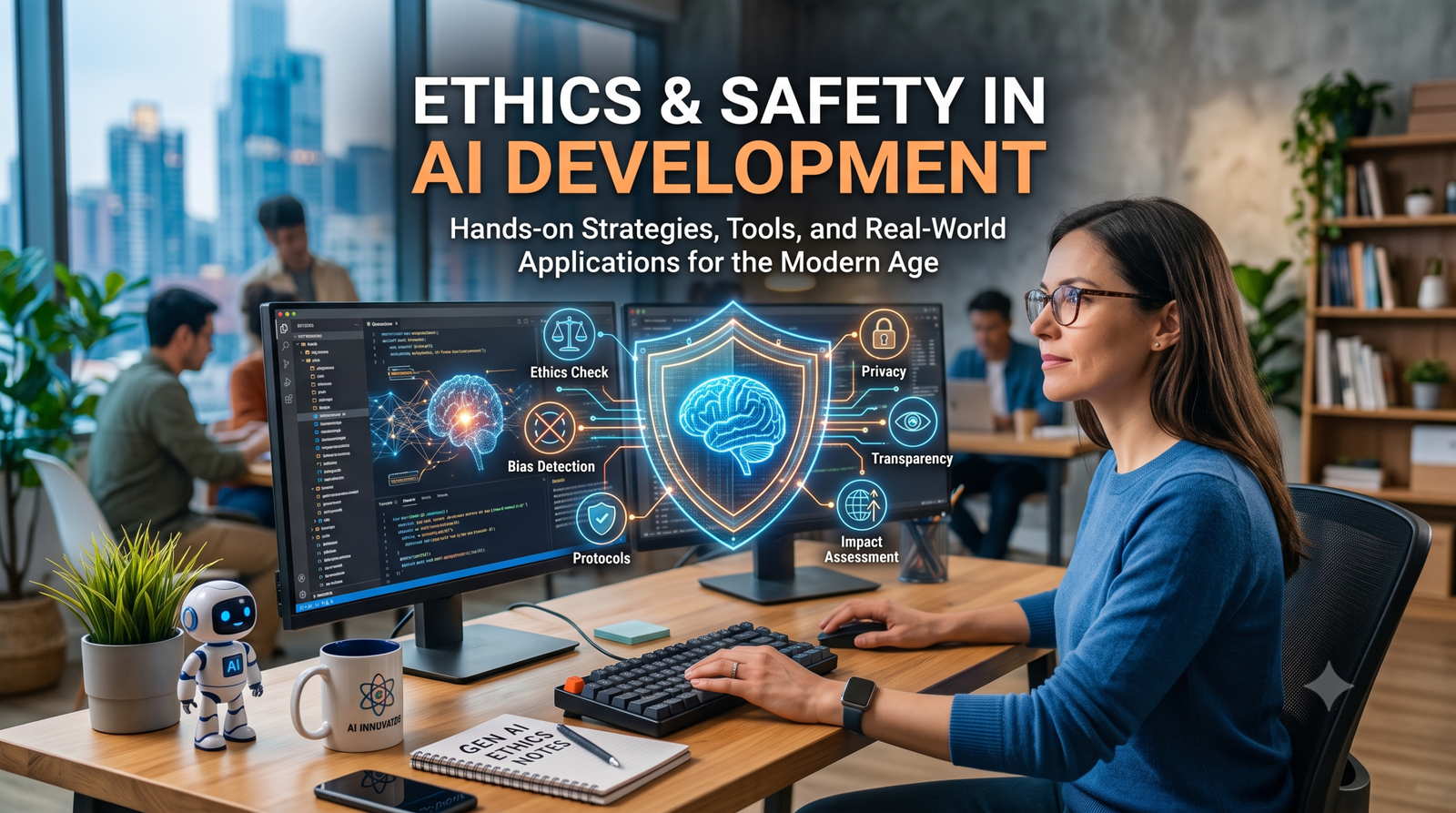
    Building Responsible Tech: The 4 Pillars of Ethical AI Development

    As artificial intelligence systems become deeper integrated into healthcare, finance, hiring, and governance, ethical AI development is no longer just an academic discussion—it is a business and regulatory imperative.

    Creating powerful AI models is impressive, but building systems that are safe, fair, and transparent is what guarantees long-term success.

    The Core Challenges Facing AI Ethics Today

    [ Algorithmic Bias ]  ──►  Unfair or discriminatory decisions
        [ Data Privacy ]      ──►  Unsanctioned use of personal data
        [ Black Box Problem ] ──►  Lack of operational transparency

    Addressing these challenges requires a framework rooted in four essential pillars.

    Pillar 1: Mitigating Algorithmic Bias

    AI models learn from historical data. If that historical data contains human biases, the AI will mirror—and often amplify—those biases.

    • In Hiring: AI resume screeners prioritizing certain demographics due to biased training data.
    • In Finance: Loan approval algorithms giving unfair scores based on zip codes or background data.

    Solution: Conduct regular dataset audits, source diverse training data, and continuously test model outputs for demographic parity.

    Pillar 2: Ensuring Data Privacy & Consent

    Training advanced models requires massive amounts of data. Respecting individual privacy rights during this process is essential.

    • Obey regulations like GDPR and updated global AI governance frameworks.
    • Implement data anonymization techniques before feeding raw data into models.
    • Provide clear opt-out mechanisms for users who do not want their data used for training.

    Pillar 3: Transparency and “Explainability”

    When an AI model denies a loan, flags a medical scan, or rejects a job applicant, stakeholders need to know why.

    This is known as Explainable AI (XAI). Organizations must move away from “black box” systems where decisions cannot be explained, adopting models that provide clear audit trails for critical decisions.

    Pillar 4: Human-in-the-Loop (HITL) Oversight

    For high-stakes applications—such as medical diagnostics, legal sentencing, or financial risk management—AI should act as a supporting copilot, not the final decision-maker.

    How Companies Can Implement Ethical AI Protocols

    1. Establish an Ethics Board: Include diverse perspective leads (legal, engineering, product, and customer advocates).
    2. Publish Privacy Policies: Be transparent about how user data trains internal systems.
    3. Conduct Pre-Deployment Red Teaming: Test models deliberately for vulnerabilities and biased outcomes before launch.

  • AI Search vs. Traditional SEO

    AI Search vs. Traditional SEO

    Beyond Google: How to Adapt to AI Search Engine Optimization (GEO)

    Search engine optimization is undergoing its biggest transformation in two decades. Traditional search engine optimization focused heavily on backlinks, keyword density, and Google’s page rank algorithm. Today, AI search engine optimization—often called Generative Engine Optimization (GEO)—requires an entirely new playbook.

    Here is what you need to know to make sure your brand remains visible when users search using conversational AI.

    What is Generative Engine Optimization (GEO)?

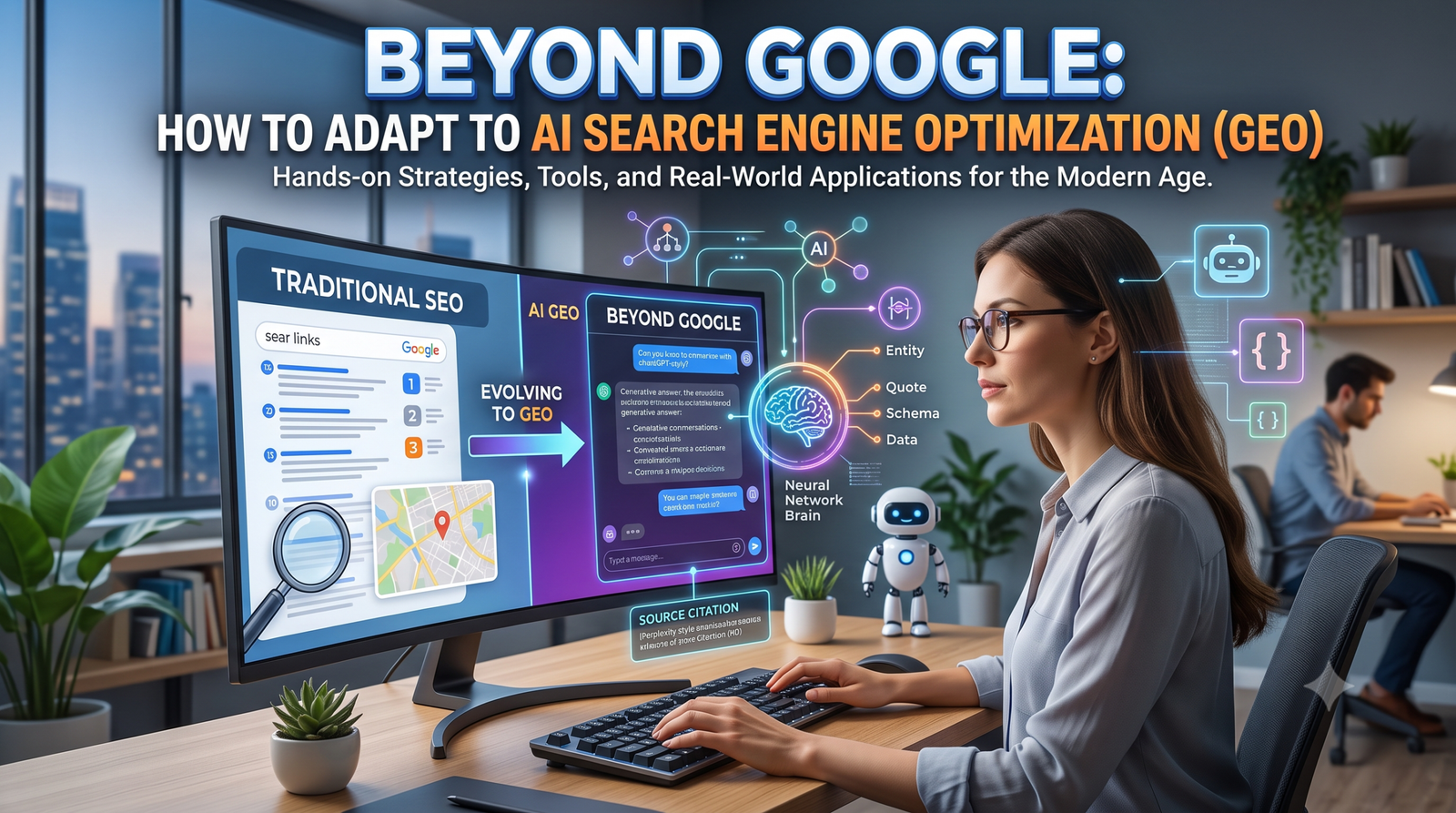
    While traditional SEO focuses on getting your link to position #1 on a search results page, GEO focuses on getting your content cited and summarized inside AI-generated answers.

    Traditional SEOAI Search Optimization (GEO)
    Focuses on blue links and SERP positionFocuses on direct AI citations & summaries
    Keyword matching and keyword densitySemantic search and contextual depth
    High domain authority and backlink volumeHigh factual accuracy and E-E-A-T signals

    Essential Strategies to Rank in AI Search Engines

    1. Build Deep E-E-A-T (Experience, Expertise, Authoritativeness, Trust)

    AI search engines favor content written by subject matter experts with real experience. Generic, surface-level content gets ignored.

    Highlight Author Credentials: Include clear author bios detailing relevant industry experience.

    Share First-Hand Data: Include original statistics, custom case studies, and proprietary research.

    2. Format Content for Scannability & Direct Answers

    AI models scan text for clear, direct answers to user queries.

    • Place a concise answer (2–3 sentences) directly under every main heading (H2/H3).
    • Use structured data markup (Schema.org) to clarify what your page is about.
    • Use Markdown tables, bulleted lists, and clean structural dividers to organize complex information.

    3. Answer Conversational Long-Tail Queries

    People search differently using conversational AI. Instead of typing “best CRM tools,” they ask “What is the best light-weight CRM tool for a 5-person real estate agency?”

    To target these searches:

    • Structure content around natural, conversational questions.
    • Include dedicated FAQ sections at the end of key articles.

    4. Build a Strong Digital Footprint Off-Site

    AI search models crawl across the web to verify facts. If your brand is mentioned across multiple authority websites, podcasts, and digital publications, AI models are far more likely to treat your brand as a primary source.

    Summary Checklist for GEO Readiness

    • [ ] Add clear author credentials to every post.
    • [ ] Include original insights, data, or personal experience.
    • [ ] Structure articles with clear headers, tables, and short summary answers.
    • [ ] Implement FAQ Schema on high-priority pages.

  • The Practical Guide to Generative AI

    The Practical Guide to Generative AI

    Generative AI for Business: 5 Practical Ways to Scale in 2026

    Artificial Intelligence is no longer just a buzzword for Fortune 500 companies. Today, Generative AI for business is leveling the playing field, giving small teams and startups access to enterprise-grade efficiency.

    If you aren’t actively using AI tools in your daily operations, your competitors likely are. Here is a practical guide on how to integrate AI workflows into your business today.

    1. Automated Customer Support & Instant Responses

    Modern AI chatbots go far beyond old decision-tree bots. Advanced language models can now:

    • Answer complex customer inquiries 24/7 in natural, human-like language.
    • Pull real-time data from your internal knowledge bases to solve issues.
    • Hand off complex tickets smoothly to human agents when needed.

    Business Impact: Reduces support ticket resolution times while cutting operational costs by up to 30%.

    2. Dynamic Content & Marketing Creation

    Creating blogs, email marketing campaigns, and social media posts manually takes hours. AI tools allow marketing teams to outline, draft, and optimize content in minutes.

    • Idea Generation: Brainstorming campaign angles and SEO-friendly blog topics.
    • Ad Copy: Generating multiple ad headline variations for A/B testing.
    • Email Sequences: Personalizing cold email outreach at scale based on recipient data.

    3. Data Analysis & Real-Time Reporting

    Unstructured data—like customer reviews, sales calls, and feedback forms—used to require manual entry and analysis. AI models can process thousands of data points instantly to deliver actionable business insights.

    4. Accelerating Internal Documentation & HR

    Onboarding new employees and maintaining internal documentation can drain operational hours.

    Using AI knowledge bases, new hires can ask questions like “What is our policy on remote expenses?” or “Where is the API key documentation?” and receive immediate, precise answers without interrupting colleagues.

    5. Rapid Prototyping & Code Generation

    For non-technical founders, building a Minimum Viable Product (MVP) used to require thousands of dollars in development fees. Modern AI coding assistants enable teams to build prototype apps, create custom scripts, and fix bugs in hours instead of weeks.

    How to Start Integrating AI Today

    1. Identify Bottlenecks: List the top 3 repetitive tasks consuming your team’s time.
    2. Pick One Tool First: Start with a dedicated tool (e.g., an AI writer, chatbot, or CRM integration) before overhauling your stack.
    3. Establish Clear Guidelines: Define data privacy and brand voice guidelines for your team.

    Final Thoughts

    Adopting AI isn’t about replacing human staff—it’s about removing busywork so your team can focus on strategic growth.

    Want to streamline your business workflows? Start by auditing your daily tasks and automating your first repetitive workflow today.

  • How AI Is Transforming Web Development and User Experience

    How AI Is Transforming Web Development and User Experience

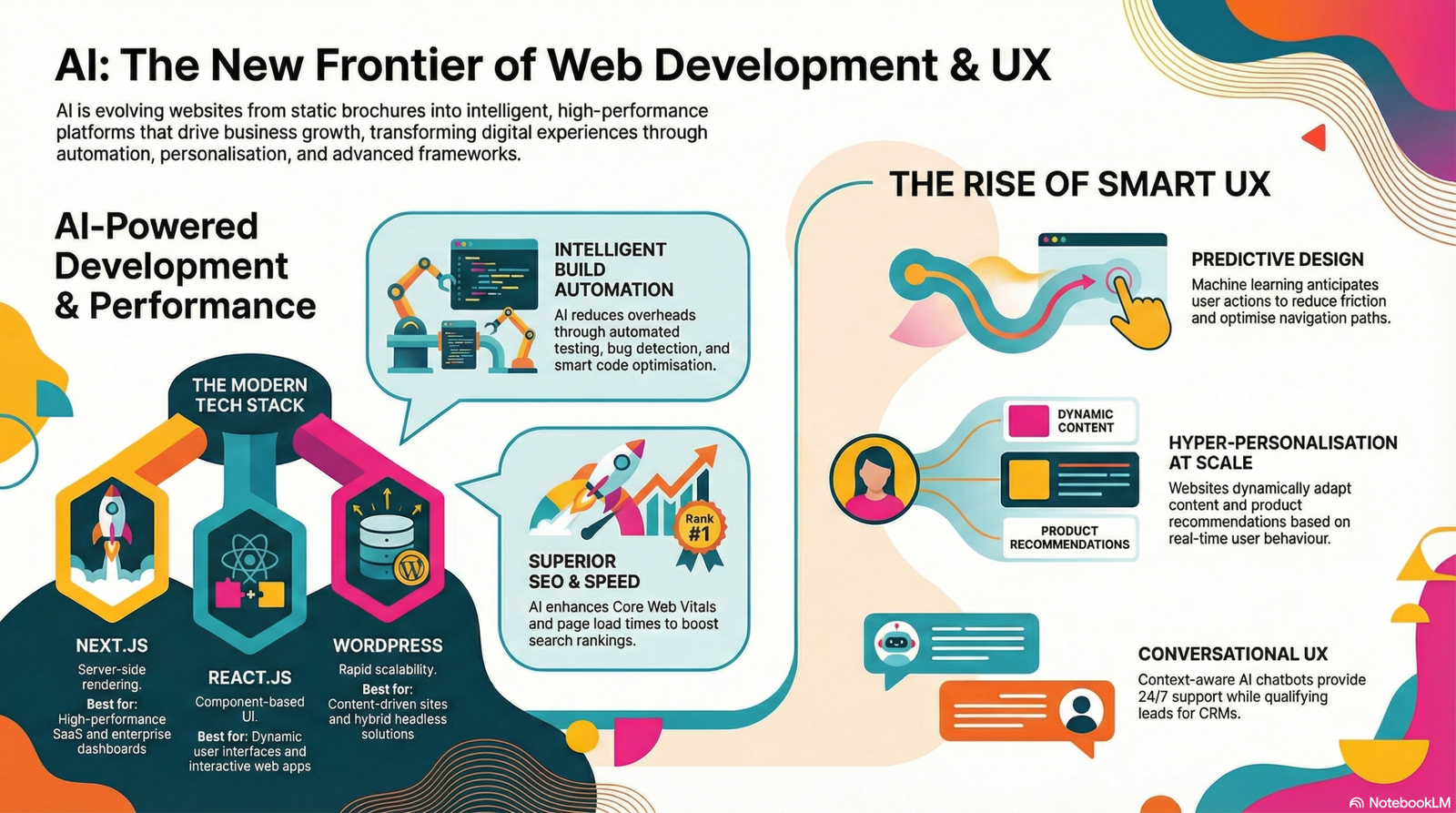
    Artificial Intelligence is no longer a futuristic concept—it’s a present-day force reshaping how websites are built, optimized, and experienced. From intelligent automation to hyper-personalized interfaces, AI in web development is redefining user expectations and business outcomes. For modern businesses in the US and Canada, adopting AI-driven web solutions is quickly becoming a competitive necessity rather than a luxury.

    This article explores how AI is transforming web development and user experience (UX), the technologies driving this shift, and how forward-thinking companies like Xhylo Technologies help businesses leverage AI for measurable growth.


    1. Introduction: Why AI Matters in Modern Web Development

    Websites today are more than digital brochures—they are intelligent platforms designed to engage, convert, and evolve with users. AI enables websites to:

    • Learn from user behavior
    • Adapt content dynamically
    • Automate repetitive processes
    • Deliver faster, smarter, and more personalized experiences

    As competition intensifies across digital markets, businesses that embrace AI-powered web solutions gain a clear advantage in performance, usability, and scalability.


    2. Modern Trends in AI, Web Development & Web Design

    AI-Driven Automation in Web Development

    AI significantly reduces development time and operational overhead through automation. Common use cases include:

    • Automated testing and bug detection
    • Smart code suggestions and optimization
    • AI-powered content generation
    • Predictive analytics for user behavior

    This allows development teams to focus on strategy, innovation, and UX/UI design best practices rather than repetitive tasks.


    Personalization at Scale

    One of the most powerful applications of AI in web development is personalization. AI analyzes user data such as location, browsing behavior, and interaction patterns to deliver:

    • Personalized landing pages
    • Dynamic product recommendations
    • Adaptive content and CTAs
    • Custom user journeys

    This level of personalization improves engagement, conversion rates, and customer satisfaction—especially in e-commerce website development.


    AI Chatbots and Conversational UX

    Modern AI chatbots go far beyond basic scripted responses. They offer:

    • 24/7 customer support
    • Context-aware conversations
    • Lead qualification and appointment booking
    • Integration with CRMs and dashboards

    Chatbots enhance smart UX by providing instant assistance while reducing operational costs.


    Smart UX and Predictive Design

    AI-driven UX focuses on anticipation rather than reaction. Predictive UX uses machine learning to:

    • Suggest next actions
    • Reduce user friction
    • Optimize navigation paths
    • Improve accessibility

    Combined with responsive web design, AI ensures seamless experiences across devices.


    Performance, SEO, and Speed Optimization

    AI helps create SEO-friendly websites by:

    • Optimizing content structure
    • Improving page load times
    • Enhancing Core Web Vitals
    • Analyzing keyword performance

    Speed and performance are no longer optional—website speed optimization directly impacts search rankings and conversions.


    3. Technology Spotlight: Why Next.js, React.js, and WordPress Are Recommended

    Next.js for Web Apps

    Next.js for web apps is ideal for businesses that demand speed, SEO, and scalability.

    Key advantages:

    • Server-side rendering (SSR) and static site generation (SSG)
    • Exceptional performance and SEO
    • Built-in routing and API handling
    • Perfect for SaaS platforms and enterprise dashboards

    Best for: High-performance web applications, SaaS products, and content-heavy platforms.


    React.js Advantages

    React.js remains a cornerstone of modern front-end development.

    React.js advantages include:

    • Component-based architecture
    • Fast rendering with virtual DOM
    • Reusable UI components
    • Strong ecosystem and community support

    Best for: Dynamic user interfaces, dashboards, and interactive applications.


    WordPress Development (Modern Approach)

    WordPress continues to power over 40% of the web—and with modern development practices, it’s more powerful than ever.

    Why WordPress still works:

    • Rapid development and scalability
    • SEO-friendly structure
    • Headless WordPress integration with React or Next.js
    • Ideal for content-driven and marketing websites

    Best for: Business websites, blogs, landing pages, and hybrid headless solutions.


    4. Best Practices & Examples of High-Performing Websites

    What Makes a Website Effective Today?

    Successful modern websites share common traits:

    • Clean, intuitive UX/UI design
    • Fast loading speeds
    • Mobile-first and responsive design
    • Clear value propositions
    • AI-powered personalization

    Examples of Good Websites

    High-performing websites (such as leading SaaS platforms, e-commerce brands, and enterprise portals) typically excel in:

    • Minimalist layouts with clear CTAs
    • Personalized dashboards and recommendations
    • Progressive web apps (PWAs) for offline access
    • Seamless navigation and accessibility

    These sites focus on user-centric design, backed by AI-driven insights.


    UX/UI Design Best Practices

    • Prioritize clarity over complexity
    • Use AI analytics to refine layouts
    • Optimize for accessibility and inclusivity
    • Continuously test and iterate using data

    5. Xhylo Technologies’ Expertise in AI-Powered Web Solutions

    Xhylo Technologies is a leading provider of custom web and software development solutions for SMBs, startups, and enterprises. With a strong focus on innovation, performance, and scalability, Xhylo helps businesses achieve true digital transformation.

    What Xhylo Technologies Delivers

    • Custom web solutions using React.js, Next.js, and WordPress
    • AI-powered SaaS platforms and dashboards
    • UX/UI design focused on conversion and usability
    • Performance optimization and SEO-friendly architectures
    • Scalable systems tailored for US and Canada markets

    Industry-Focused Innovation

    Xhylo specializes in:

    • SaaS and enterprise portals
    • E-commerce website development
    • Business automation platforms
    • Analytics-driven dashboards

    By combining AI, modern web design trends, and advanced development frameworks, Xhylo delivers fast, secure, and future-ready digital products.


    6. Conclusion & Key Takeaways

    AI is transforming web development from static design into intelligent, adaptive experiences. Businesses that adopt AI-driven strategies benefit from:

    • Smarter automation and reduced costs
    • Personalized user experiences
    • Improved performance and SEO
    • Higher engagement and conversions

    Actionable Advice for Businesses

    • Invest in AI-powered personalization and analytics
    • Choose the right technology stack (Next.js, React.js, WordPress)
    • Prioritize performance, UX, and scalability
    • Partner with an experienced development team like Xhylo Technologies

    The future of web development is intelligent, data-driven, and user-centric—and AI is leading the way.


  • How AI is Affecting the Real World

    How AI is Affecting the Real World

    AI’s influence extends beyond the tech world—it’s reshaping our daily lives and industries in 2026. From healthcare to transportation, AI technologies are improving efficiency, safety, and decision-making.

    In healthcare, AI-assisted diagnostics help doctors identify conditions earlier, improving patient outcomes. Autonomous vehicles and AI-driven traffic management systems are making urban mobility safer and more efficient. Retailers use AI to personalize shopping experiences, predicting consumer preferences and increasing customer satisfaction.

    While AI creates new opportunities, it also raises questions about employment and ethics. Some routine jobs are being automated, requiring workforce reskilling. Ethical AI implementation is critical to ensure fairness, transparency, and accountability.

    Xhylo Technologies advocates for responsible AI adoption, focusing on solutions that deliver real-world benefits while addressing societal and ethical challenges. By understanding AI’s tangible effects, businesses and individuals can navigate this rapidly evolving landscape effectively.