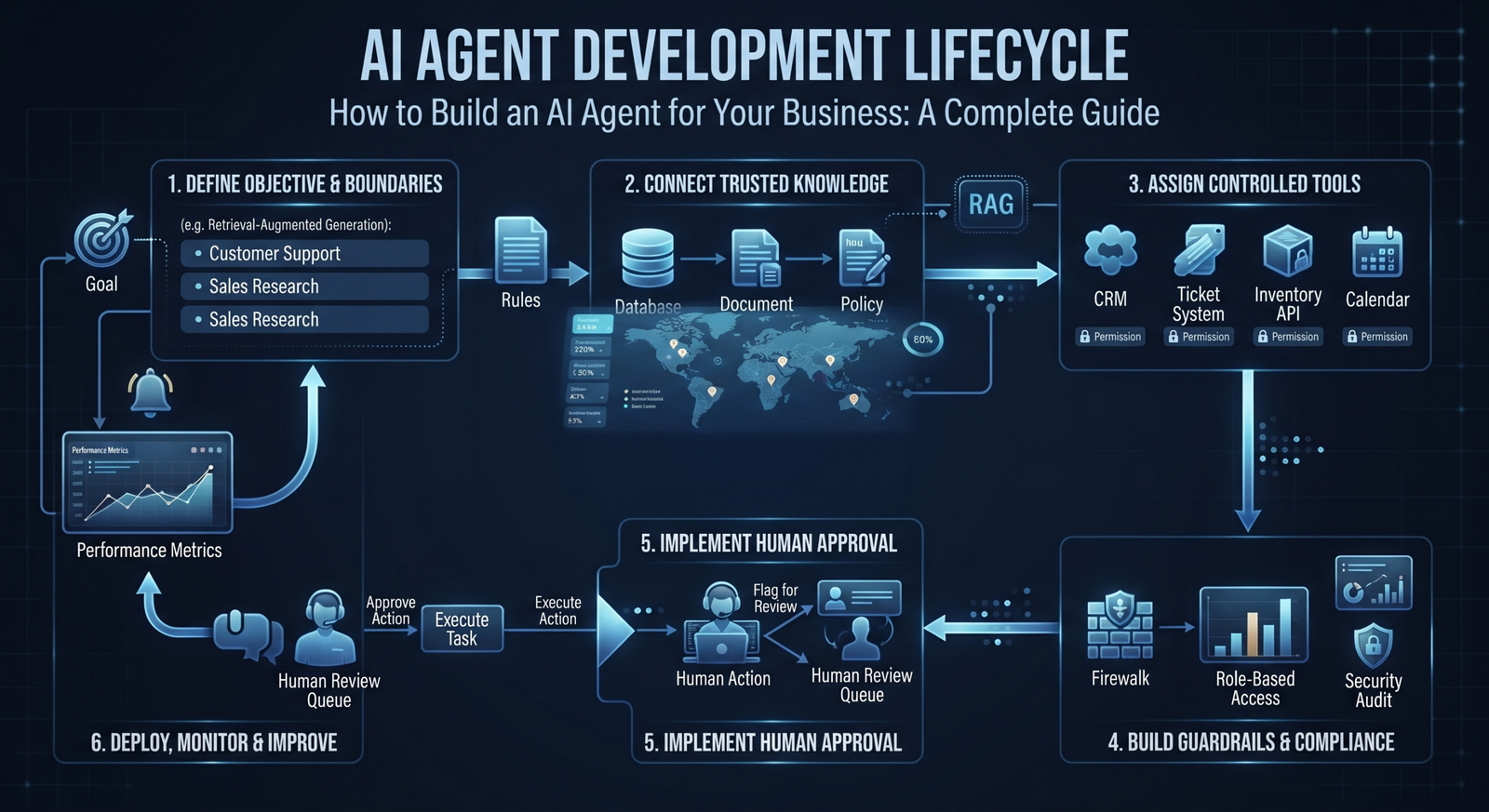
AI agents are becoming an important way for businesses to turn large language models and other AI capabilities into systems that can perform useful work. But building a reliable AI agent is more than connecting a model to a chatbot interface.
A business-ready agent needs a clear objective, access to the right information, carefully designed tools, security controls, testing, and ongoing monitoring.
This guide walks through the major steps involved in building an AI agent for a real business environment.
1. Start With a Specific Business Problem
Do not begin with “We need an AI agent.” Begin with a measurable problem.
For example:
- Support agents spend too much time searching internal documentation.
- Sales teams manually research every new prospect.
- Operations teams repeatedly investigate similar exceptions.
- Employees struggle to find answers across disconnected systems.
A narrow and valuable problem is easier to test than a general-purpose assistant. Define what success looks like before choosing a model or building an interface.
2. Define the Agent’s Goal and Boundaries
An agent needs a clear mission. Write down what it is allowed to do, what it must never do, and when it must ask a human for help.
For example, a support agent may be allowed to search a knowledge base and create a support ticket. It may not be allowed to issue refunds or change customer account information without authorization.
Boundaries are a product requirement, not an afterthought.
3. Map the Agent Workflow
Even autonomous systems need structure. Map the typical flow:
Input → Understand the request → Gather context → Decide on an action → Use an approved tool → Check the result → Respond or escalate.
This map helps identify where the agent needs data, where deterministic automation is sufficient, and where human approval is necessary.
4. Choose the Right Model and Architecture
The best model depends on the task, required accuracy, latency, privacy requirements, supported languages, cost, and deployment constraints.
You may also need additional components such as retrieval-augmented generation for company knowledge, specialized models for document or image processing, and traditional software logic for validation.
The architecture should serve the business requirement. Bigger models are not automatically better solutions.
5. Connect the Agent to Trusted Knowledge
An agent should not invent company policies or depend on uncontrolled information sources. Connect it to curated and authorized knowledge.
This may include product documentation, support articles, internal policies, technical manuals, or approved databases. Retrieval systems can provide relevant context at the time of a request.
Knowledge sources should be maintained, permission-aware, and traceable so teams can understand where an answer came from.
6. Give the Agent Carefully Controlled Tools
Tools allow an agent to do more than generate text. Depending on the use case, it may search a CRM, create a ticket, query an inventory system, schedule a meeting, or trigger an internal workflow.
Every tool should have defined permissions, input validation, and limits. The agent should receive only the access required for its job.
7. Add Human Approval Where the Risk Requires It
Not every action should be fully autonomous. High-impact actions involving money, customer accounts, legal commitments, production systems, or sensitive data may require human approval.
A useful pattern is human-in-the-loop operation. The agent can research, prepare, and recommend an action, while an authorized employee provides final approval.
8. Build Guardrails and Security Controls
Business agents need protection against incorrect instructions, unauthorized access, prompt injection, sensitive data exposure, and unintended tool use.
Important controls can include authentication, role-based access, allow-listed tools, input and output validation, audit logs, rate limits, data handling policies, and escalation rules.
9. Test With Realistic Scenarios
Do not evaluate an agent only with a handful of ideal examples. Test normal cases, ambiguous requests, incomplete information, adversarial inputs, tool failures, and requests that should trigger escalation.
Create an evaluation set based on real business scenarios. Measure accuracy, task completion, safety behavior, latency, and cost. Testing should continue after deployment because business data and user behavior change over time.
10. Deploy, Monitor, and Improve
Once the agent is ready for production, monitor how it performs. Track useful metrics such as successful task completion, escalation rate, error rate, response time, user satisfaction, and cost per completed task.
Logs and feedback can reveal where the agent lacks knowledge, where tools fail, and where the workflow should be redesigned. An AI agent is an evolving system, not a one-time software delivery.
A Practical Example
Imagine a B2B company building an AI sales research agent. The agent receives a new lead, checks approved data sources, reviews the company profile, identifies relevant products, summarizes useful signals, and prepares a research brief.
The sales representative reviews the brief before contacting the prospect. The agent accelerates preparation while the human remains responsible for relationship-building and final decisions.
This type of focused agent is often more useful than a broad assistant that attempts to do everything.
Conclusion
Building an AI agent for business requires more than a powerful model. The most successful agents are designed around a specific objective, connected to reliable knowledge and tools, constrained by clear permissions, and continuously evaluated.
Start small, choose a measurable use case, and build from a controlled pilot toward production. This approach reduces risk while helping the organization discover where AI agents can create lasting value.
Xhylo helps businesses design, develop, integrate, and deploy custom AI agents that work with real business systems and workflows.